

14 Sep 2026 How We Keep our AWS Sandpit from Becoming a Permanent Bill
Giving every engineer access to an AWS sandpit is a useful way to prototype quickly. It also creates a predictable problem, experiments are easy to start and surprisingly easy to forget. An idle load balancer, database, NAT gateway, or collection of volumes can continue generating charges long after the person who has deployed it has forgotten about it.
This post explains how we use AWS Nuke and FinOps alerting to keep our Sandpit account clean. It’s important to note we view our Sandpit account as disposable, please do not apply this approach to an environment that contains anything you cannot afford to lose.
What AWS Nuke does
AWS Nuke is an open-source command-line tool that discovers AWS resources through the APIs and removes resources that are not excluded by its configuration. This is different from deleting a CloudFormation or Terraform stack, these tools know about resources in their own state, while AWS Nuke scans the account across all configured regions.
Our configuration targets all regions. It also contains a blocklist of other account IDs and bypasses the alias check only for the intended sandpit account. Those checks are important because a destructive command should fail when it is pointed at the wrong account.
Architecture Overview
The diagram below shows how GitHub Actions authenticates to AWS, how cleanup runs against the sandpit account, and how both cleanup and FinOps alerts reach Google Chat.
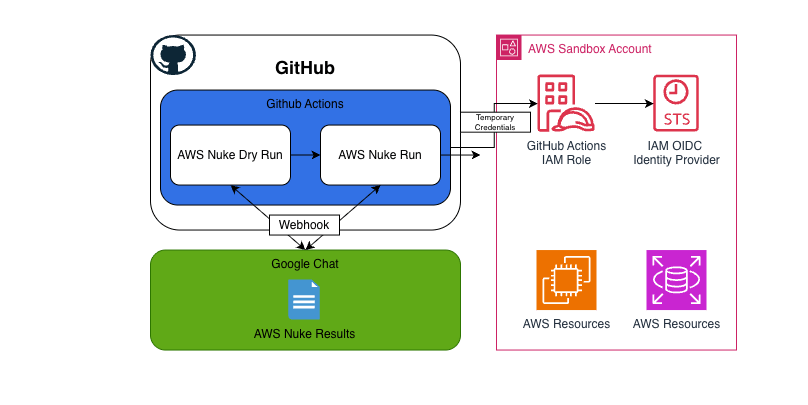
The flow begins in GitHub Actions, where the scheduled dry-run and cleanup workflows use GitHub’s OIDC identity provider to assume an AWS IAM role and receive temporary credentials. The dry-run workflow scans the AWS sandpit and reports the resources that would be removed, while the cleanup workflow performs the deletion of resources that are not protected by the AWS Nuke configuration. Both workflows send their results to Google Chat through a webhook, giving the team visibility into the proposed or completed cleanup.
The cleanup schedule
We split cleanup into two GitHub Actions workflows.
Dry run
The first workflow is a dry run, we run this the day before the actual clean up workflow. It produces a report showing:
- resources that would be removed;
- resources excluded by configuration;
- resources excluded by the
aws-nuke: disabletag; - errors encountered during the scan; and
- resources that previously failed to be removed.
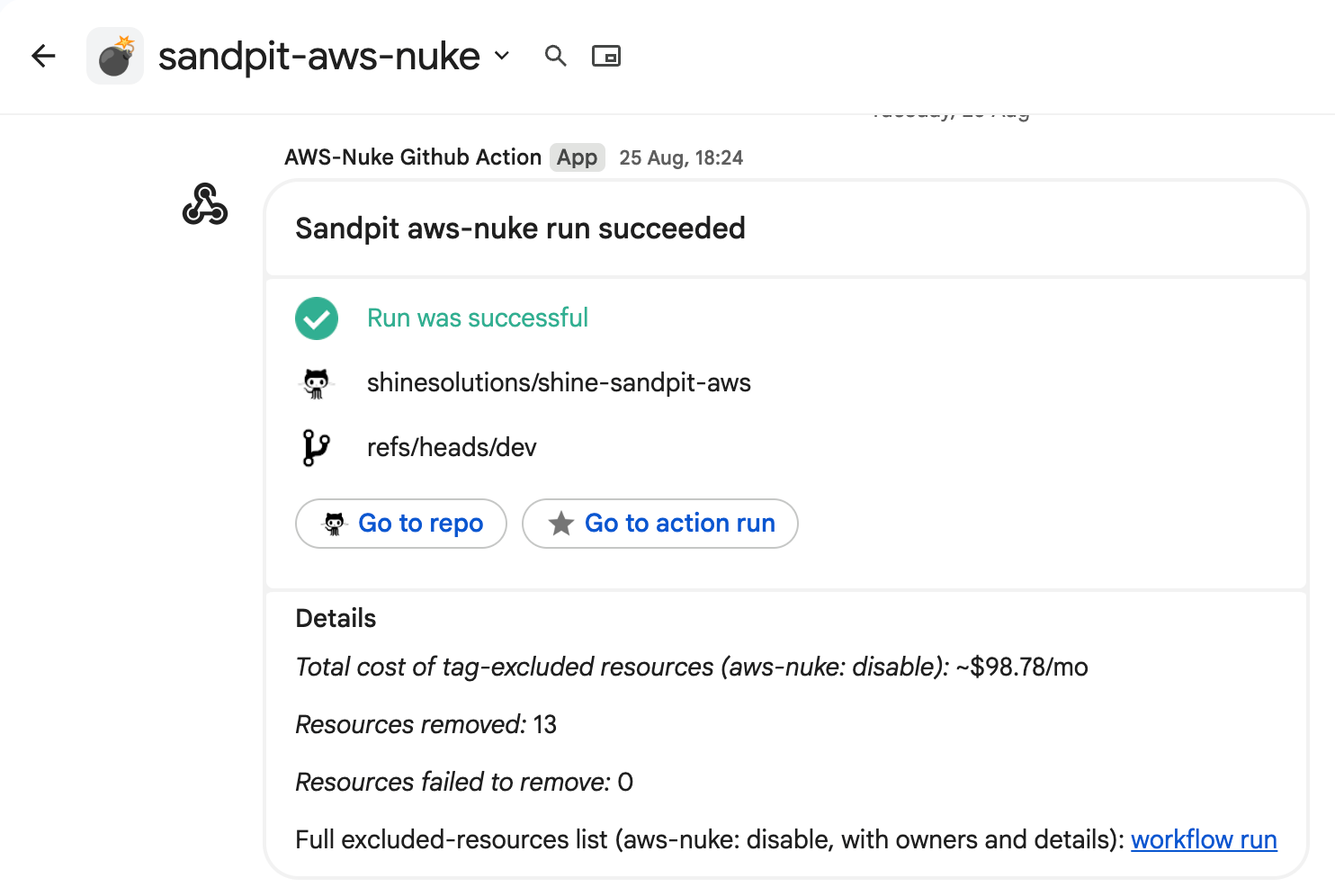
The report is added to the workflow summary and uploaded as an artifact. A Google Chat notification gives the team the headline counts and a link to the full report. This creates a review window before deletion.
Cleanup run
The second workflow performs the actual cleanup. It is scheduled weekly and can also be started manually. The workflow records removal and failure counts, publishes the report, and sends the result to Google Chat.
How we protect resources
The AWS Nuke configuration tells the tool where to scan and which resources to leave alone. It includes account safety checks, resource-type exclusions, and reusable filters for system resources, CloudFormation stacks, CDK infrastructure, and resources that are currently in use.
Any resource matching a configured filter is retained. Everything else becomes a cleanup candidate, the dry run reports it, and the actual run deletes it where possible. This makes the configuration the safety boundary for the account, protected resources should be tagged deliberately and reviewed regularly.
Explicit protection by tag
The most useful rule for developers is:
tag:AWS Nuke: disable
Resources with this tag are preserved. The configuration also recognises tag:role:AWS Nuke, which supports resources where the tag is represented through a role-specific property.
This tag is a conscious decision that a resource should survive the next cleanup. It should be used sparingly and paired with an owner tag, because protected resources can continue to cost money.
Structural and system protection
Additional presets preserve resources that should not be treated as abandoned experiments, including:
- AWS, Control Tower, and IAM Identity Center system resources
- CDK bootstrap resources
- CloudFormation-managed resources
- Default VPC resources
- Resources currently in use, such as attached volumes and active network interfaces.
The configuration also excludes resource types that are unsupported, deprecated, not taggable, or known to cause AWS Nuke scans to stall. An exclusion is not necessarily a protected billable resource; sometimes it is simply a resource that AWS Nuke cannot safely analyse.
Making the report useful
Raw AWS Nuke output is detailed but difficult to scan, so we turn it into a readable report grouped into resources to remove, resources excluded by tags, structural exclusions, and errors.
At the same time, the workflow queries Cost Explorer for the previous 30 days and groups unblended cost by:
- resource owner and AWS service; and
- AWS service alone as a fallback for resources without an owner tag.
Cost Explorer generally cannot attribute a service bill precisely to an individual resource ID. The report therefore shows approximate monthly cost. Where several resources share an owner and service bucket, it divides that total and labels the result as a shared estimate. This is a prioritisation signal, not a precise savings calculation.
The report also totals the estimated monthly cost of resources intentionally excluded by aws-nuke: disable. That number answers an important question: “What are we choosing to keep alive?” It does not claim that every dollar would have been saved by deleting the resource.
FinOps Alerting: the early warning system
The AWS Nuke Cleanup is a backstop. The FinOps Alerts tells us about cost growth before the weekly cleanup window.
Our FinOps Alerts capture three monthly budgets:
- An automatic historical budget that adjusts from the previous six months of spend and alerts at 100%, 150%, and 200% for both actual and forecasted cost.
- A fixed budget, currently configured at $1,400, that alerts when actual or forecasted cost exceeds 100%.
- A Bedrock-specific budget, currently configured at $200, filtered to inference operations and alerting at 100% actual or forecasted cost.
It also creates a Cost Anomaly Detection monitor for AWS services. An anomaly with at least $25 of total impact generates an immediate notification containing the affected service, score, expected and actual spend, likely root causes, and an AWS Console link.
The two systems answer different questions:
- FinOps: Is spending unusually high or heading toward a limit?
- AWS Nuke: Which resources should no longer exist in this disposable account?
Together they provide both a financial signal and an enforcement mechanism.
The operating model
In practice, the operating model is straightforward:
- Engineers create resources to experiment.
- FinOps alerts when spend exceeds a budget or becomes anomalous.
- The Monday dry run shows what AWS Nuke would remove and what protected resources cost.
- The Tuesday run removes resources that were not protected or excluded.
The main lesson is not that a destructive tool removes the need for discipline. It is that a disposable sandpit can make the desired discipline enforceable. If an experiment needs to persist, it needs an owner, a reason, and an explicit protection decision. Otherwise, it is temporary by default.
Results
The chart below is taken from AWS Cost Explorer in our AWS Sandpit account, it covers approximately the first eight months of the implementation. During that period, average monthly spend fell from $3,950 AUD before the change to approximately $516 AUD per month afterwards: an 86% reduction.
That reduction represents approximately $20,000 AUD in estimated cost avoidance over the following six months. The figures are based on the AWS Cost Explorer data shown in the chart and should be read as a comparison with the previous spending pattern, not as a guarantee that every dollar would otherwise have been charged.

Conclusion
AWS Nuke gives a disposable AWS sandpit a clear lifecycle. Resources can be created freely, reviewed during a dry run, and removed automatically when they are no longer protected. FinOps budgets and anomaly detection add an earlier warning when costs begin to rise, while ownership and protection tags make deliberate exceptions visible.
The broader lesson is that automation works best when the account’s boundaries are explicit. AWS Nuke cannot replace judgement, but it can turn a cleanup policy into a repeatable process.
If your AWS bill is higher than expected, Shine may be able to help. Get in touch to discuss practical ways to improve visibility, ownership, and cleanup across your AWS environments.

No Comments