


29 Jun 2026 S3 Tables: What are they, what problem do they solve, and when do you need them?
In this blog I am going to talk about what Amazon S3 Tables are, how they differ from regular S3 storage, the problems they solve, and whether you actually need them for your data platform.
What are S3 Tables?
S3 Tables are a table layer built on top of S3 that changes how data is organised and queried at scale.
Instead of storing data as standalone files, S3 Tables organise it into structured tables using Apache Iceberg. S3 is still the storage layer underneath, but the way data is represented shifts from “files in a bucket” to “managed tables with metadata, versions, and structure”.
Consequently, S3 Tables have a number of advantages over using raw S3:
Faster queries
S3 Tables deliver query speeds up to three times faster than standard S3 buckets running self-managed Iceberg, and support up to ten times more transactions per second . This comes from continuous background optimisation rather than periodic manual tuning
Less manual work
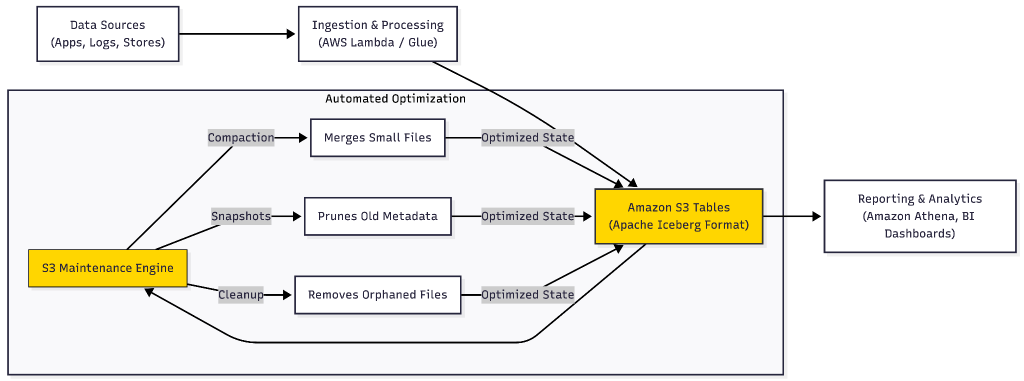
S3 continuously performs automatic maintenance operations, such as compaction, snapshot management, and unreferenced file removal, which streamlines the operation of data lakes at scale by reducing the need for manual table maintenance.
Lower costs (with caveats)
AWS’s pricing examples show this holding up well for moderate, steady workloads a 1 TB table with typical batch ingestion and 500,000 monthly GET requests comes out to about $35/month, which is a small price for automated maintenance. AWS also cut compaction pricing significantly in 2025: per-object compaction prices are now 50% lower, while per-byte processing prices are 90% lower for binpack compaction.
What problem do S3 Tables solve?
S3 Tables are particularly useful for data lakes. A data lake using S3 buckets will rapidly grow to a point where small files are piling up faster than anyone can clean them up, queries are getting noticeably slower, and compaction has turned into a recurring chore. More specifically, you will encounter:
- The “Small File” Problem: A pipeline writing data every few minutes can leave you with hundreds of thousands of tiny objects within a few months, and query engines burn a lot of time just opening and reading them. This is an overhead that has little to do with the actual data being processed.
- Metadata Bottlenecks: Metadata gets expensive. Before a query can run, the engine has to figure out which files are relevant listing and scanning objects just to know where to look. When it is a few thousand files that is instant. But at a few million, it takes longer than the query itself.
- Operational Overhead: the maintenance tasks: compaction jobs, cleanup scripts, snapshot management, all the work that exists purely to keep up the performance.
How S3 Tables work
With regular S3, everything is an “object”. Additional concepts like folders, prefixes and naming conventions aren’t native to S3 itself. Instead, it’s all logic your team has to build and maintain on top, usually with AWS Glue or some tooling.
S3 Tables introduce optimisation and structure. It organises data into Iceberg-backed tables and lets you create namespaces similar to schemas in PostgreSQL or Snowflake. It compact small files for you, and cleans-up snapshots in the background. This means that queries stay fast without anyone having to manually manage the mess.
| Feature | Regular S3 Files | Amazon S3 Tables |
| Primary Unit | Independent Objects | Structured Tables |
| Organization | Manual Folders/Prefixes | Managed Namespaces |
| Optimization | Manual Compaction Jobs | Automatic Background Maintenance |
| Metadata | External (Glue/Hive) | Integrated and Optimized |
| Performance | Standard Throughput | 10x Higher Update/Delete Speed |
There are two main types of S3 Table buckets. Customer-managed buckets are created and controlled by teams. They define structure, permissions, and how tables are organised.
AWS-managed buckets are created by AWS services. In these cases, the expectation is that the data is consumed rather than actively managed by users.
Integration with AWS Services
S3 Tables is built to work directly with the AWS tools most teams already use, so you don’t need to rethink your entire architecture. For example:
- Athena can query S3 Tables with regular SQL. Furthermore, since the metadata’s already managed, it’s not stuck scanning thousands of files to figure out what’s there before a query even starts. This means the startup time noticeably improves.
- Glue picks up schemas and permissions straight from the Data Catalog, so the same tables stay consistent and discoverable across teams without anyone manually syncing them.
Built on Open Standards
S3 Tables run on the Apache Iceberg open table format (as opposed to something AWS-specific). That means you’re not stuck if you ever want to query the same data with Snowflake, Spark, or Trino instead of Athena. You get the convenience of a managed service without signing away your ability to leave.
When should you use S3 Tables?
S3 Tables become relevant when S3 stops feeling like simple storage and starts behaving like a system that needs constant tuning.
That usually shows up as slower queries, growing pipeline maintenance, or increasing complexity in how data is organised.
Common use cases
One common scenario is continuous data ingestion. For example, retail app where data is arriving constantly. Over time, file counts grow quickly and performance starts to degrade.
Another is frequently changing data. Financial or compliance systems often need updates or deletions, which are expensive in traditional file-based setups.
Large analytics environments are another example, especially when multiple teams rely on the same datasets and consistency becomes important.
How it fits into a typical workflow
In most setups, the workflow does not change dramatically.
Data is still ingested into S3, processed using tools like AWS Glue or Lambda, and then queried through analytics engines like Athena.
The difference is that the final storage layer is structured as tables rather than raw files, which removes the need for additional maintenance pipelines.
A real-world example
Imagine a retail organisation that collects data from stores, online platforms, and mobile apps for daily reporting
Without S3 Tables:
- Data is stored as multiple files in S3
- Teams manage folders, cleanup, and file organisation manually
- As data grows reporting becomes slower
With S3 Tables:
- Data is stored in structured tables
- Processing tools like AWS Lambda or AWS Glue can still be used
- Queries run directly on the structured data
- System handles optimisation automatically
The main difference is that structure and performance tuning are handled by the platform instead of being built and maintained manually.
Performance context
The improvements depend on what S3 Tables are being compared against.
Coming from a raw S3 data lake, most of the win is just not scanning thousands of irrelevant files anymore.
Coming from Hive-style tables, which already had structure, what you’re losing is the manual tuning and the slow fragmentation that creeps in over time.
Coming from Iceberg setup, the data model barely changes; what goes away is compaction, the catalog, and the infrastructure underneath it.
When not to use S3 Tables
S3 Tables aren’t worth it everywhere. If your data sets are small, stable, and not getting queried much, you’d be adding complexity for no real reason by using S3 Tables.
S3 Tables also don’t have much to offer when it comes to unstructured data like images, video and PDFs, which don’t become more useful by being “tabular.” If you’ve already got Snowflake or Redshift handling analytics well, swapping in S3 Tables underneath probably won’t help much
In short, the real fit for S3 Tables is when you need structured analytics, not just storage.
The trade-offs of S3 Tables
The main trade-offs of S3 Tables relate to control and visibility:
- There is less ability to fine-tune how data is physically optimised. Systems that rely heavily on custom partitioning or tuning may find S3 Tables limiting.
- There is also a stronger dependency on AWS services, even though the underlying format remains open.
- Another trade-off is transparency. Because optimisation is handled by the system, debugging low-level behaviour becomes less direct.
- Finally, migration is not always simple. Moving from existing S3 or Iceberg-based systems requires pipeline changes and validation work.
Conclusion
S3 Tables sit in a specific part of the data stack. They are not a replacement for S3, and they are not meant to compete with full data warehouses.
They matter when S3 starts to require ongoing maintenance to keep performance stable.
If data is simple, stable, and well within control, traditional S3 is usually enough.
If data growth turns storage into something that needs constant tuning and cleanup, S3 Tables remove a large part of that operational load and keep the system closer to its intended role which is storing and serving data, not managing it.

No Comments