


03 Dec 2024 Transforming Automated Testing with Generative AI – Part 1
In the modern software development landscape, automated testing isn’t just a luxury. It’s our survival kit to ensure scalability, consistency, and efficiency in delivering high-quality applications, especially with tight deadlines and high user expectations.
However, traditional automated testing approaches often struggle to handle the rapid speed of continuous delivery and changing requirements. In particular, many applications require constant updates, which adds significant manual effort and maintenance costs to create new and fix existing tests.
Legacy applications can throw an extra wrench in the works if they have no existing automated tests. This can result in months of setting up frameworks and CI/CD pipelines, identifying what the system is supposed to do, and then writing tests for every such scenario and edge case.
I think Generative AI can transform the traditional testing landscape. In this post, I’m going to explain why, and present an example of it in action.
How Generative AI Can Help
Generative AI leverages machine learning and uses sophisticated neural networks to create new content by analysing patterns from vast amounts of training data. It acts like a super-powered alien friend who can understand natural language and development challenges, create test cases, generate synthetic test data, and identify edge cases that we humans might miss.
Sometimes it can be the case that you spend five minutes changing one line of production code, and then the rest of the day fixing broken automated tests. Generative AI can help with this by dynamically adapting to application changes, automatically updating test scripts, and maintaining test coverage with almost magical efficiency.
Generative AI can also help with flaky tests. How many times have you clicked the “rebuild” button in the hope that the next run of the testing will pass? Generative AI can analyse patterns in test results, identify unstable elements or even the root causes of test flakiness, and adjust test code to resolve the issue.
As a developer who has always preferred developing features over testing them, Generative AI has actually made me excited about testing! It can really help keep developers stay in the development groove, rather than get bogged-down in flaky and hard-to-maintain tests.
Generating Automated Testing Scripts with a Fine-Tuned Model
Ok, now that you know how generative AI can tackle the challenges in traditional automated testing approaches (and how it transformed my love-hate relationship with testing), let me walk you through an example.
There are many popular models, such as OpenAI’s GPT, Anthropic’s Claude, and open-source options like CodeGen or StarCoder which can produce incredible results in the automated testing realm. In this example, I will take CodeGen, fine-tune it with provided datasets, and use it to generate automated testing scripts. The system under test is a simple registration form, and our scripts will be for TestCafe.
I wrote a program that takes form HTML as an input and extracts all the field names and input id values from it. So if you consider the following example form:
<form id='registration-form'>
  <label for="firstName">First Name</label>
  <input placeholder="First name" name="firstName" id="firstName"/>
  <label for="lastName">Last Name</label>
  <input placeholder="Last name" name="lastName" id="lastName"/>
  <label for="agencyName">Organisation/Agency</label>
  <input aria-label="agencyName" name="agencyName" type="text" id="agencyName"/>
  <label for="postcode">Postcode*</label>
  <input aria-describedby="postcode" name="postcode" required="" type="text" id="postcode"/>
  <label for="email">Email Address*</label>
  <input aria-describedby="email" name="email" required="" type="email" id="email/">
  <small>* Mandatory fields</small>
  <button id="register-btn" type="submit">Register</button>
</form>
then the program will extract the following field names and id values from it:
- First Name;
firstName - Last Name;
lastName - Organisation/Agency;
agencyName - Postcode;
postcode - Email Address;
email - Register;
register-btn
Next, I built a Retrieval-Augmented Generation (RAG) system to generate a prompt and fine-tuned the model with around 100 datasets.
Though the example handles only a specific use case, I designed the solution so that it can be scaled up to much more complex scenarios.
RAG System
If you are not already familiar with the idea, a RAG system allows you to fetch relevant information from a database or external sources using embedding and vector search techniques. It processes the information and forms it as a “Prompt”.
Essentially, the prompt is telling the model the background, context and information it will need to learn in order to answer questions consistently and reliably. In this example, I set up a local FAISS vector database and prepared the data including the field name as a key, and documents with detailed information about each field. The program loads this initial data into the FAISS database. The data file looked like this:
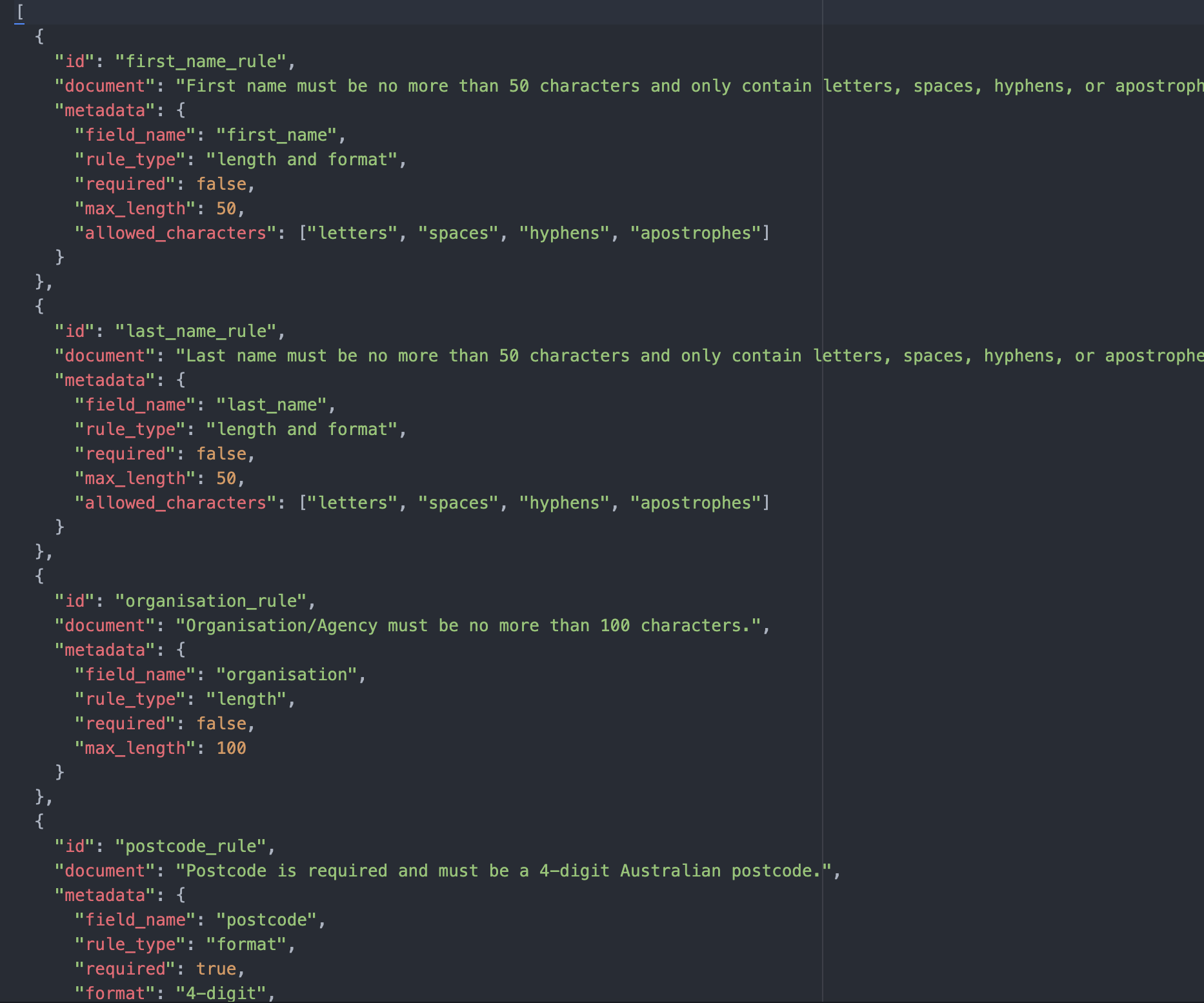
I converted the normalised field names into bytes and stored them in the database. Note that if you are dealing with a more complicated scenario, a transformer model might be needed.
I then queried based on each of the field names (extracted from HTML) using a k-NN search, with the indexes of each result being used to look up each document value from a map. Eventually, it constructs a prompt with those documents as additional context information.
Using vectors for searching allows for situations where the field name from the HTML doesn’t match what’s in the RAG dataset. For example, the HTML contains a field called “Organisation/Agency” whereas the field name in the RAG data is called “organisation”, which the vector search is still able to match accurately.
The final prompt looked like this:

Model Training
I chose the CodeGen-350M model to use in this example as it’s open-source, focused on code-generation, and lightweight. I fine-tuned it to generate TestCafe automated scripts for our form-based registration pages.
To train the model to produce the desired result, I spent a lot of time creating high-quality datasets, including comprehensive descriptions of various HTML elements and their expected behaviour with validation in test automated scenarios.
The dataset contained both input and completion data. The input data is the detailed description of what the test script does. The completion data contains TestCafe example automated scripts that cover most general & edge cases and validation for a registration form.
The model uses 80% of the subsets for training and 20% for testing, with a gradual learning rate to avoid overshooting the optimal model configuration. It goes through the entire dataset three times to learn patterns. I saved checkpoints at the end of each epoch to document how datasets and hyperparameters tweaking impact the output. This process took several iterations.
Result
Running the fine-tuned version of the model with HTML as input produced the following:

This is a very basic automated script for populating input fields and submitting the form. Some elements are missing, and there are minor syntax errors. Nor is there any validation or error-message handling.
The model definitely requires further refinement, combining more information and context in the RAG to train its ability to generate correct and executable TestCafe scripts that cover all positive and negative cases.
To do this it would be necessary to fine-tune a larger model than CodeGen-350M, with more parameters. This would give it the ability to capture more complex patterns, but also be harder to train, and require cloud-based infrastructure.
Architecture Design for the Solution in AWS
In the AWS cloud, we could scale up our approach by using OpenSearch with vector support to save the vector and document metadata, a lambda to query the OpenSearch database, construct a prompt, and then run the model by calling an AWS SageMaker endpoint.
How data is loaded into the OpenSearch database depends on the use case, where the data is from, and the format to convert. For the fine-tuning process, you can write scripts in a Jupyter notebook to initiate a training job in AWS SageMaker, and then deploy the trained model in a SageMaker endpoint.
The various parts of the solution would fit together like this:

Conclusion
Generative AI is transforming how we approach software development and there has been a lot of hype around it in the market. Shine is investing time to identify how AI can bring value to us and our customers in the short to medium term using approaches like the one outlined in this blog. There is large potential but more work is needed, which we will continue to explore. In the meantime, we have noticed encouraging initial improvements in software engineering efficiency. Tasks that used to eat up days of development time could be now handled automatically by AI in a matter of minutes.
A custom solution that trains a large language model offers powerful capabilities, although achieving consistent quality outputs will require significant additional refinement of both the RAG system and the model. In my next post, I will compare this custom solution with using well-known models like OpenAI’s GPT-4.

No Comments